Open-source robotic hand

A human hand, rebuilt in the open.

Tendra Hand is an open-source, 3D-printed, tendon-driven robotic hand, built in public on GitHub. It aims to move like yours: the first step toward a robot that can cook, clean and use tools as well as you. Code is Apache-2.0, hardware CERN-OHL-S-2.0, docs CC BY 4.0.
Explore the projectView on GitHub

The idea

Every joint, its own motor.

Many robotic hands take a shortcut: one motor curls a whole finger, and the fingers can only open and close together. That is fine for grabbing a cup, but not for turning a key or picking up a coin.

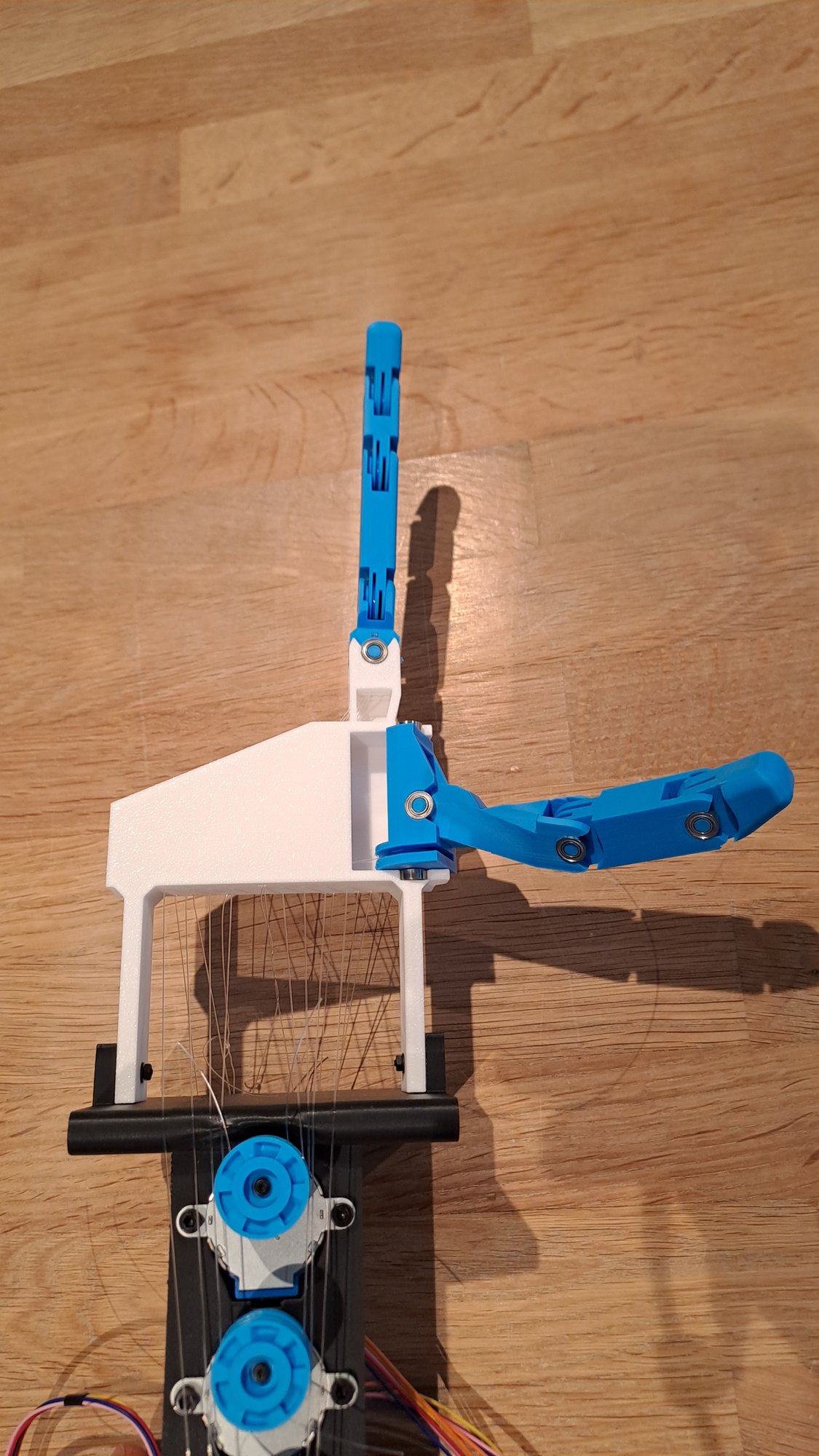
Tendra Hand gives every joint its own motor, so each one can move on its own, just like in a real hand. The first prototype is a thumb and an index finger, with 8 joints between them.

  • Thumb and index finger first
  • 8 joints, 8 motors
  • Printed in PLA or PETG

Tendons

Pulled by cords, like your own fingers.

Most of the muscles that move your fingers sit in your forearm. They pull on long cords, called tendons, that run along the bones. Tendra Hand works the same way, which is what "tendon-driven" means.

Each joint has one closed loop of cord wrapped around a small spool on its motor. Turn the spool one way and the joint bends. Turn it back and the joint straightens. One motor does both.

  • One cord loop per joint
  • One motor bends and straightens
  • Motors stay out of the fingers

Joints

The same joints as a human finger.

A finger has three bending joints: the knuckle (MCP), the middle joint (PIP) and the joint near the tip (DIP). The knuckle can also move a little from side to side. The index finger copies all four motions.

The thumb has a base that swings it across the palm, plus three joints that bend. Each motion a joint can make is called a degree of freedom, or DOF. The prototype has 8 of them.

  • Index: side-to-side, MCP, PIP, DIP
  • Thumb: base rotation, CMC, MCP, IP
  • Positive angle means closing the hand

Parts

Made on an ordinary 3D printer.

The skeleton is a set of printed parts in PLA or PETG, the two most common printing plastics. No machining, no special tools.

The design lives in Fusion 360. The CAD, the printable files and the robot model will all be published, so you can print it, change it and share it back. Softer TPU fingertip pads are planned for a better grip.

Electronics

A brain and a spinal cord.

A computer does the thinking. It decides where each joint should go and sends the angles over a USB cable. Later, this is where the AI will run.

A small ESP32-S3 microcontroller does the reflexes. It turns each angle into smooth motor motion, speeding up and slowing down gently so nothing jerks. Today the motors are small 28BYJ-48 steppers. Next come Feetech SCS0009 smart servos, which can report where they are.

  • Joint angles sent in radians over USB
  • Smooth speed-up and slow-down
  • Motors switch off when idle to save power
  1. ComputerPython: planning, simulation and, later, AI
  2. ESP32-S3Firmware: smooth, safe motor control
  3. 8 motorsSteppers today, smart servos next
The computer sends joint angles over USB. The ESP32-S3 turns them into motor steps. Each motor pulls a tendon that moves one joint.

By the numbers

Small today. Built to grow.

8joints in the prototype, each with its own motor
20joints in the full hand (V1), driven by 16 servos
100%open source: design, code and research
131gof printed plastic, calculated from the 3D model

Roadmap

From two fingers to a robot that helps at home.

The end goal is a robot that can cook, do chores and use tools as well as a person. It starts with the hardest part: the hand.

See the full planSee the whole journey
  1. Phase 0

    Done

    Phase 0: Foundation

    Set up the project and get the hand model moving in simulation.

  2. Phase 1

    In progress

    Phase 1: V0 prototype, thumb and index

    A first start: make the 8-joint thumb and index prototype move cleanly on stepper motors, controlled from the computer.

    • Firmware with smooth speed-up and slow-down for all 8 motors (tested on the computer)
    • Motors switch off when idle to stay within the power supply
    • Python control library that works on the simulation and the real hand
    • Digital twin software: move a slider on screen and the real joint follows (not yet tried on the hand)
    • Still to do: first power-on, motor direction checks and calibration of each joint
    • Still to do: basic motions like open, close, pinch and point
  3. Phase 2

    In progress

    Phase 2: Tendra Hand V1, the first full hand

    Five fingers and 20 joints, moved by 16 smart servos that report their own position (each fingertip joint follows its middle joint, like in a human finger). This is the first real Tendra Hand.

    • Middle, ring and little fingers, copied from the index and sized like a human hand (designed in Fusion 360)
    • A thumb with 4 joints (a fifth was tried and dropped)
    • All 16 servos in the forearm, with every tendon in its own channel through the palm and wrist
    • Full-hand simulation model: 20 joints and 36 tendons
    • Firmware for the servo bus, ready for all 16 servos, with the same Python code as V0
    • Still to do: electronics and a power supply big enough for 16 servos
    • Still to do: wire all 16 servos on one shared data cable, through an FE-URT-1 adapter
    • Still to do: print a test section of the tendon channels, then print and assemble the whole hand
    • Still to do: read back position, load and temperature, and show the measured positions live in the digital twin
    • Still to do: compare the V0 steppers with the V1 servos for speed, precision, force and noise
  4. Phase 3

    Planned

    Phase 3: Mechanics and a realistic simulation

    Make V1 robust and the simulation behave like the real thing.

  5. Phase 4

    Planned

    Phase 4: Sensing

    Give the hand a sense of touch and a camera.

  6. Phase 5

    Planned

    Phase 5: AI control

    Teach the hand to move by itself.

  7. Phase 6

    Planned

    Phase 6: Seeing and grasping

    Use the camera to find objects and handle them.

  8. Phase 7

    Planned

    Phase 7: Understanding tasks

    Go from "do this motion" to "do this job".

  9. Phase 8

    Planned

    Phase 8: Arm, body and real chores

    Take the hand out of the workshop and into a home.

Build it, change it, share it.

The design, firmware, simulation and research notes are all on GitHub. Download them, try the hand in simulation on your own computer, or help build the next finger.

Get the files on GitHub