About Tendra Hand
The project
Tendra Hand is an open-source, 3D-printed, tendon-driven robotic hand with the same joints as a human hand, as the first step toward a robot that can do what people do. Built step by step, and shared completely.
- 20joints in the full hand
- 8joints in the prototype
- 3open licenses
- 100%open source
The goal#
The big goal is a robot that can do what people do, just as well: cook a meal, fold the laundry, load the dishwasher, use everyday tools. Not only pick things up, but understand a task and carry it out, step by step.
The hand is where it starts. Almost everything useful we do goes through our hands, and a hand that is as skilled as a human one is still the hardest part of building a helpful robot. So Tendra Hand first aims to do what your hand does: pinch a coin, turn a key, hold a pen. To get there, it needs the same joints as a human hand, and every one of them has to move on its own. Then come touch and vision, AI that learns skills and understands tasks, and finally an arm and a body to use it in a real home.
A human hand can make more than 20 separate motions. Each one is called a degree of freedom (DOF). The full Tendra Hand (V1) has 20 of them, driven by 16 servos: each fingertip joint follows its middle joint, like in a human finger. The current prototype is the first step: a thumb and an index finger with 8 joints.
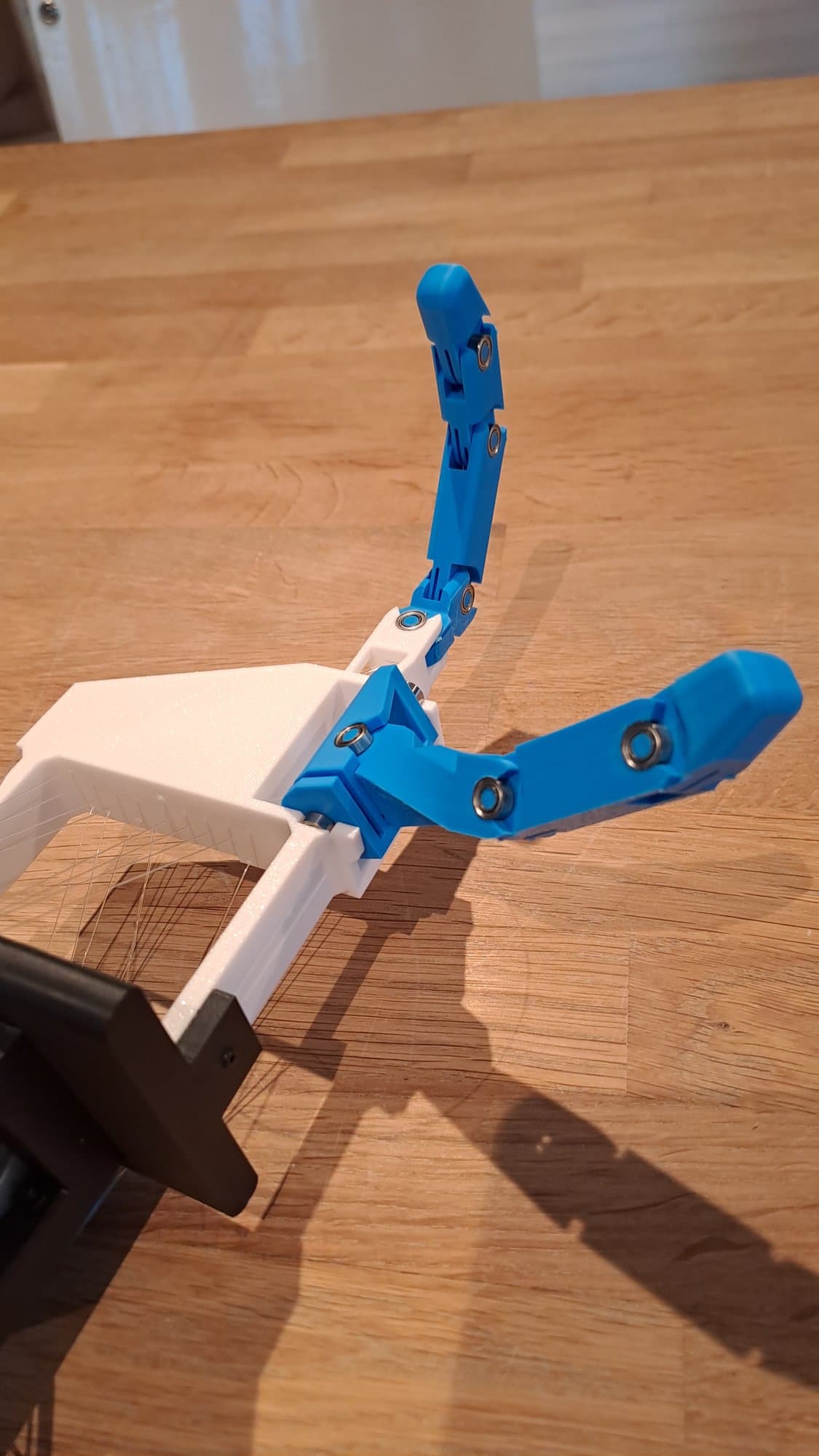
And all of it is open source. The 3D design, the printable parts, the firmware, the control software, the simulation, future AI models and the research notes are free to use, change and build on.
Design decisions#
Mechanics
Why tendons?
Motors are heavy and bulky. Putting them inside the fingers makes the fingers thick and clumsy. With tendons (thin cords that pull on the joints, like the ones in your arm), the motors can sit further back and the fingers stay slim.
Control
Why one motor per joint?
Many hands use one motor to curl a whole finger. That is simpler, but every joint then moves in a fixed pattern. Giving each joint its own motor makes the hand harder to build, but it can do much more: bend just the fingertip, hold a pinch, or roll an object between fingers.
Motors
Why steppers now, servos next?
The 28BYJ-48 stepper motors are cheap and easy to get, which makes them good for a first prototype. But they can't tell where they are, so every joint has to be straightened by hand before power-up. Feetech SCS0009 smart servos report their own position and share one data cable, so they are the next step.
Electronics
Why a computer and a microcontroller?
The computer is the brain: it plans the motions and will later run the AI. The ESP32-S3 microcontroller is the spinal cord: it only turns joint angles into smooth motor motion. This split keeps the fast, time-critical work on the ESP32 and the heavy thinking on the computer.
A few more choices shape the whole project:
- Printed in PLA or PETG. Anyone with an ordinary 3D printer can make the parts.
- Simulation first. A virtual copy of the hand in MuJoCo (a free physics simulator) runs on any laptop. It lets us test ideas before touching the hardware, and later train AI safely.
- The same code for sim and real. A script written for the simulated hand runs unchanged on the real one.
- Angles, not motor steps. The computer always talks in joint angles. Only the ESP32 knows about motors, so swapping steppers for servos doesn't change anything above it.
Where it stands#
The project is early. Here is an honest snapshot.
| Part | Status |
|---|---|
| Thumb and index finger design, 8 joints | Done |
| Simulation model in MuJoCo, checked against the real hand | Done |
| Firmware with smooth motion, tested on the computer | Done |
| Python control library and digital twin software | Done |
| Finishing the physical prototype, first power-on and calibration of each joint | In progress |
| Tendra Hand V1: five fingers, 20 joints, 16 smart servos. Designed and simulated, not built yet | In progress |
| Touch sensing, camera and AI control | Planned |
| Understanding tasks, an arm and real chores | Planned |
Roadmap#
Phase 0
DonePhase 0: Foundation
Set up the project and get the hand model moving in simulation.
- Project structure, public repo and licenses
- Checked the Fusion 360 export and wrote down its problems
- Converter from the CAD export to a MuJoCo simulation model
- Simulation viewer with a slider for every joint
- Simulated motions checked against the real hand
Phase 1
In progressPhase 1: V0 prototype, thumb and index
A first start: make the 8-joint thumb and index prototype move cleanly on stepper motors, controlled from the computer.
- Firmware with smooth speed-up and slow-down for all 8 motors (tested on the computer)
- Motors switch off when idle to stay within the power supply
- Python control library that works on the simulation and the real hand
- Digital twin software: move a slider on screen and the real joint follows (not yet tried on the hand)
- Still to do: first power-on, motor direction checks and calibration of each joint
- Still to do: basic motions like open, close, pinch and point
Phase 2
In progressPhase 2: Tendra Hand V1, the first full hand
Five fingers and 20 joints, moved by 16 smart servos that report their own position (each fingertip joint follows its middle joint, like in a human finger). This is the first real Tendra Hand.
- Middle, ring and little fingers, copied from the index and sized like a human hand (designed in Fusion 360)
- A thumb with 4 joints (a fifth was tried and dropped)
- All 16 servos in the forearm, with every tendon in its own channel through the palm and wrist
- Full-hand simulation model: 20 joints and 36 tendons
- Firmware for the servo bus, ready for all 16 servos, with the same Python code as V0
- Still to do: electronics and a power supply big enough for 16 servos
- Still to do: wire all 16 servos on one shared data cable, through an FE-URT-1 adapter
- Still to do: print a test section of the tendon channels, then print and assemble the whole hand
- Still to do: read back position, load and temperature, and show the measured positions live in the digital twin
- Still to do: compare the V0 steppers with the V1 servos for speed, precision, force and noise
Phase 3
PlannedPhase 3: Mechanics and a realistic simulation
Make V1 robust and the simulation behave like the real thing.
- Study tendon routing, friction and tension, and model the tendons in simulation
- Soft TPU fingertip pads
- Measure real speed, friction and play, and tune the simulation to match
- Weigh the printed parts and update the model
Phase 4
PlannedPhase 4: Sensing
Give the hand a sense of touch and a camera.
- Touch and force sensing in the fingertips
- A camera to see the hand and what it holds
- Sensor data in the Python library and the simulation
Phase 5
PlannedPhase 5: AI control
Teach the hand to move by itself.
- Control the hand by moving your own hand in front of a webcam
- Learn from recorded demonstrations
- Train in simulation on cloud GPUs, then transfer to the real hand
- Optional: larger-scale training in NVIDIA Isaac Sim or Isaac Lab
Phase 6
PlannedPhase 6: Seeing and grasping
Use the camera to find objects and handle them.
- Detect objects with the camera and plan how to grasp them
- Harder tasks: turning objects in the hand, using tools, everyday objects
- Publish benchmarks and results
Phase 7
PlannedPhase 7: Understanding tasks
Go from "do this motion" to "do this job".
- Tell the hand what to do in plain words, and it works out the actions from what the camera sees
- Break a long task, like making a sandwich, into steps and pick the right skill for each
- Notice when something goes wrong, like a dropped object, and try again
- Learn a new task from a few human demonstrations
- An open dataset of hand demonstrations for household tasks
Phase 8
PlannedPhase 8: Arm, body and real chores
Take the hand out of the workshop and into a home.
- Put the hand on a robot arm, then use two hands together
- Kitchen tasks: cut, stir, pour, crack an egg, cook a simple meal
- Chores: fold laundry, load the dishwasher, tidy up
- A body that can move from room to room
- Safe around people: gentle forces and stopping on unexpected touch
Open source, all of it#
Everything is published under open licenses that allow commercial use:
- Apache-2.0 for code (firmware, Python, simulation, AI code and models)
- CERN-OHL-S-2.0 for hardware (CAD, print files, electronics, robot model). If you share a changed hardware design, share its files under the same license.
- CC BY 4.0 for docs and research. Use them freely, just credit the project.
Want to help? See how to contribute.